I am trying to use the Cadet to perform simulation on a pre-loaded column, which initial condition is described as the partial occupation (q ratio) of total adsorption capability (q max).
I have modified the code accordingly as the follows:
model.root.input.model.unit_001.init_q = [q_ratio*q_max,]
However, the resulting breakthrough curve seems starting breakthrough immediately from the q ratio I set (if I set q_ratio=0.2, it starts from 0.2, if I set q_ratio=0.4, it starts from 0.4 etc…).
Please feel free to run my code and check if the breakthrough curve of a pre-loaded column should be like the output of the Cadet Simulation.
As the empty column behaves as expected, I think the protein is binding to the column under the given parameters.
That being said, for pre-loaded columns (q_ratio=0.2, 0.4), does the spike of breakthrough at the beginning comes from the washed-off protein that was initially binded to the column?
In addition, for the initial q, is it possible to set different values at different column section using Cadet? For example, my column was not uniformly loaded as the initial condition.
regarding the binding behavior: I still think the protein doesn’t bind.
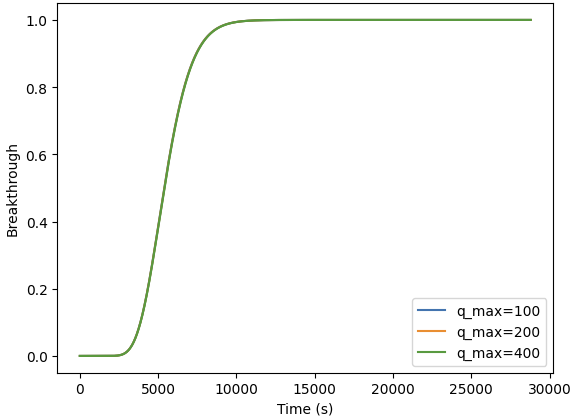
If I change q_max over a range of values (100, 200, 400) and keep your ka (ka = 3.7698203876889015e-5) & kd, I get this graph:
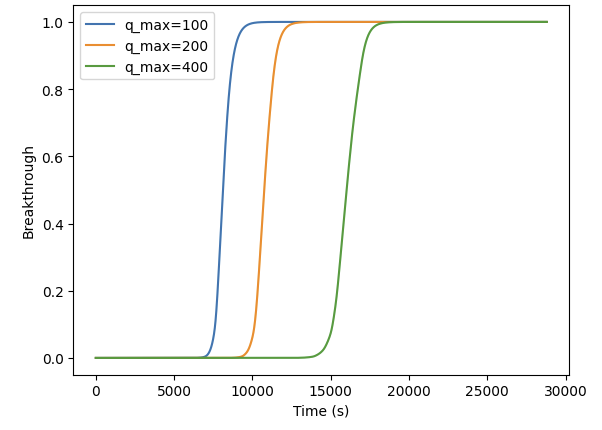
If I change ka to ka = 3.7698203876889015e-1 I get this graph.
I don’t think the protein is binding to the column with the ka and kd. Which also explains the spike of breakthrough, as the protein “bound” to the column during initialization isn’t stable in it’s binding and elutes right away.
That is possible using the INIT_STATE property of CADET Unit operations. They are structured as [c^bulk in component-axial major; (c^p,c^s) in component-radial-axial major].
Here is how you could create such a state vector:
    n_comp = 1
    col_step = 20
    par_step = 6

    c_state = np.ones((n_comp, col_step))
    q_state = (np.ones((n_comp, par_step, col_step))
               * np.linspace(1, 0.2, n_comp).reshape(-1, 1, 1)  # Add a gradient along the component axis
               * np.linspace(1, 0.2, par_step).reshape(1, -1, 1)  # Add a gradient along the particle axis
               * np.linspace(1, 0.2, col_step).reshape(1, 1, -1)  # Add a gradient along the column axis
               * qmax)
    cp_state = np.ones((n_comp, par_step, col_step)) * 0.2 * qmax
    particle_state = np.stack([cp_state, q_state], axis=0)

    full_state = np.concatenate([
        c_state.flatten("F"),
        particle_state.flatten("F")
    ])