Issues possibly related to PyPI metapackage installation (without conda)

Expected behavior.

Repicating the codes from CADET-Workshop/02 CADET Fundamentals/02.1 first steps/02.1.1_breakthrough.ipynb at solution · cadet/CADET-Workshop · GitHub

  1. Successful autodetection of CADET with “simulator = Cadet()”.
  2. No errors with “simulation_results = simulator.simulate(process)”.

Actual behavior

  1. Cannot autodetect CADET until the path is manually specified, even then, only the built-from-source CADET-Core was detected (neither via conda nor pip)
  2. CADETProcess.CADETProcessError.CADETProcessError: CADET Error: Simulation failed with IO ERROR: Field “NPARTYPE” does not exist in group /input/model/unit_002 when trying to run the simulation.

How to produce bug (including a minimal reproducible example)

  1. Create a basic, default virtual environment on Visual Studio 2026
  2. Activate the virtual environment
  3. Run “pip install cadet” in PowerShell
  4. Copy the codes from CADET-Workshop/02 CADET Fundamentals/02.1 first steps/02.1.1_breakthrough.ipynb at solution · cadet/CADET-Workshop · GitHub

Hi ucbevng,

Welcome to the forum and thanks for posting your issue!

To better understand what might be causing the problem, I would need a bit more information.

When you are inside your virtual environment, could you please run the following commands and post the output?

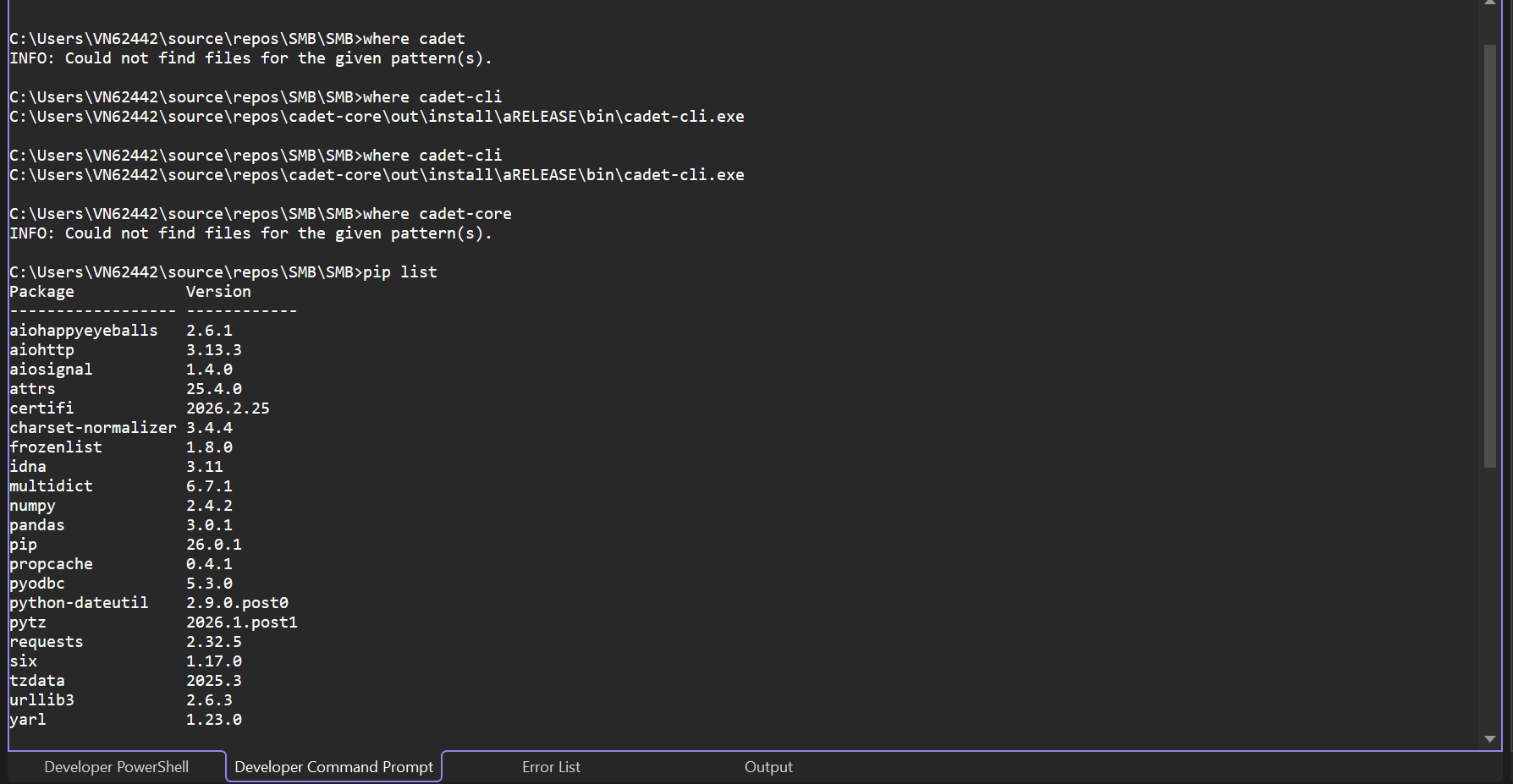
where cadet
where cadet-core
where cadet-cli
pip list

In particular, it would be helpful to see which CADET-related packages and versions are installed.

My suspicion is that you have a CADET build from source on your global PATH, possibly a pre-release version that is not compatible with CADET-Process. If that path is visible inside your virtual environment, CADET-Process might detect that installation instead of the CADET version associated with your environment (for example the one installed via pip or conda).

In that case, CADET-Process may end up using the wrong executable.

One way to resolve this is to ensure that the PATH inside the virtual environment points to the correct CADET installation. Alternatively, you can explicitly specify the CADET installation when creating the simulator:

simulator = Cadet(install_path="path/to/cadet")

Here, install_path should point to the directory of the desired CADET installation (the directory of the cadet-core pip package that contains the cadet-cli).

If you report back with the requested information, I am confident we can narrow down the issue and find a solution.

Best,
Hannah


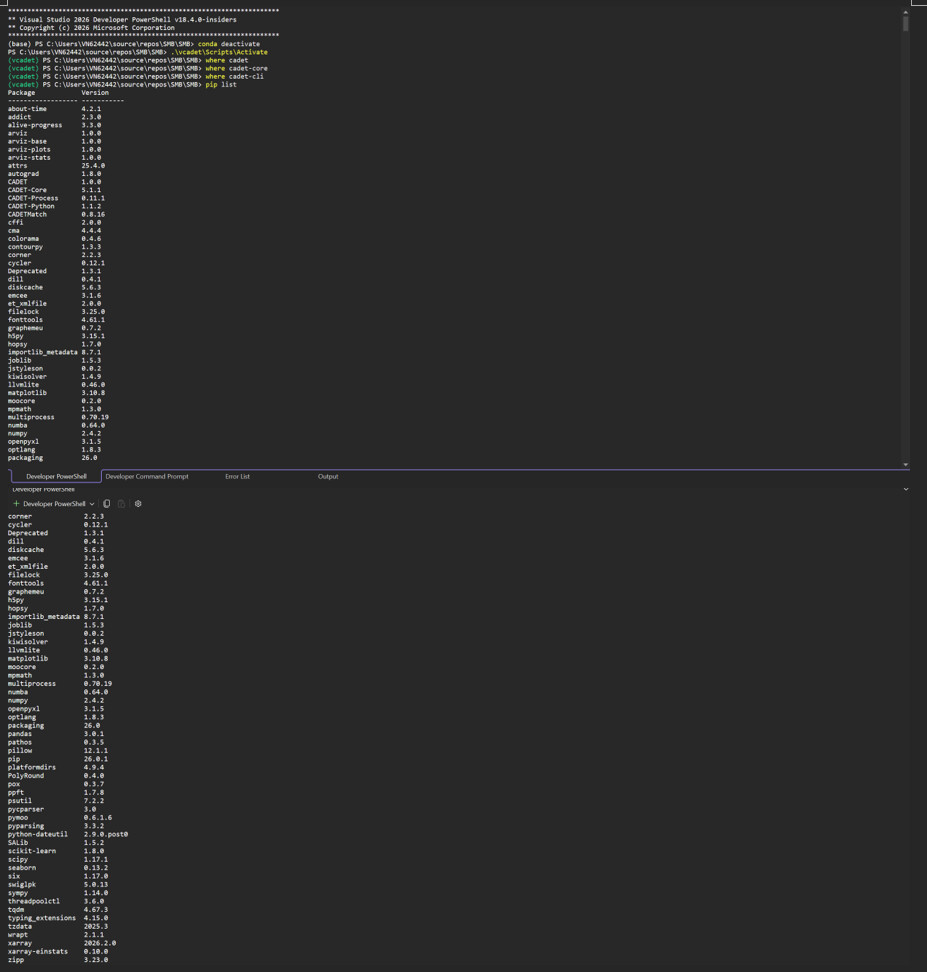
The screenshot above is the “where” commands and pip list output. I just merged 2 screenshots together because I do not know how to transfer the output from VS2026 to a .txt file :sweat_smile: .
simulator = Cadet(install_path=“C:\Users\VN62442\source\repos\SMB\SMB\vcadet\Lib\site-packages\cadet_core\bin”)resulted in SyntaxError: (unicode error) ‘unicodeescape’ codec can’t decode bytes in position 2-3: truncated \UXXXXXXXX escape
simulator = Cadet(install_path=r"C:\Users\VN62442\source\repos\SMB\SMB\vcadet\Lib\site-packages\cadet_core\bin")resulted in autodetection failure (this file path is towards cadet-cli.exein the virtual environment).
So far, only simulator = Cadet(install_path=r"C:\Users\VN62442\source\repos\cadet-core\out\install\aRELEASE")succeeded in detection (this is the file path of the locally-built CADET-Core.
I hope these are what you need. Coding in general is not my forte :sweat_smile:

Hi ucbevng,

The pip list looks alright, the “where” command unfortunately didn’t print any outputs, since you are in the power shell. Can you possible use the Command Line Interface (CMD) instead and repeat the commands?

I will have a look at how the autodetect interacts with the CADET-Core package in the meantime.

Thanks,
Hannah

Can you try

Cadet(install_path=r"C:\Users\VN62442\source\repos\SMB\SMB\vcadet\Lib\site-packages\cadet_core")

or

Cadet(install_path=r"C:\Users\VN62442\source\repos\SMB\SMB\vcadet\Lib\site-packages\cadet_core\bin\cadet-cli")

Do these work for you?


This cmd output is after I activated vcadet in PowerShell.

This yielded Test simulation completed successfully, no “NPARTYPE” error.

This resulted in autodetection failure.

Hi ucbevng,

That exactly confirms my suspicion.

At some point, the path to cadet-cli was added to your global PATH environment variable. Because of that, it appears when you run where cadet-cli. CADET-Process detects the executable built from source on the PATH and assumes that this is the default CADET installation you want to use.

This behaviour is intended and not a CADET issue. The PATH variable is controlled by the user, and any executable placed there will be detected automatically.

Also note that if you are not working inside an isolated environment (e.g., a conda environment or a Python venv), this can easily lead to the issue you are seeing. On Windows you effectively only have one global PATH, which means you can only have one CADET installation reliably available via cadet-cli at a time. If multiple CADET installations exist on your system, the one that appears first on the PATH will be used, which may not be the one you intended.

You now have three options.

Option 1: Remove CADET from the global PATH and update with desired version (not recommended)

You could remove the CADET entry from the global PATH and replace it with the installation you actually want to use.

On Windows this can be done via:

Start Menu → search for Environment VariablesEdit the system environment variablesEnvironment Variables → select PathEdit.

There you can remove the CADET entry or add a different one pointing to another CADET installation. After changing the PATH, you need to open a new terminal for the changes to take effect.

However, this approach is usually not ideal if you work with multiple CADET builds.

Option 2: Add the correct CADET installation to the environment you are using

Instead of relying on the global PATH, you can add the CADET installation to the PATH inside the environment you are working in.

For a Conda environment

Activate your environment:

conda activate your_env

Temporarily extend the PATH:

set PATH=C:\path\to\cadet;%PATH%

If you want this to persist for that environment:

conda env config vars set PATH=C:\path\to\cadet;%PATH%

Then deactivate and activate the environment again.

For a Python venv

Activate the environment and edit the activation script:

<venv>\Scripts\activate.bat

Add a line such as:

set PATH=C:\path\to\cadet;%PATH%

This ensures that the correct CADET version is used whenever that environment is activated.

Option 3: Direct configuration (recommended in your case)

In your situation, explicitly setting the CADET installation path is likely the simplest solution:

Cadet(
    install_path=r"C:\Users\VN62442\source\repos\SMB\SMB\vcadet\Lib\site-packages\cadet_core"
)

This bypasses automatic detection and directly tells CADET-Process which installation should be used.

You already confirmed that this works for you, right? Does this solve your problem?

Cheers,
Hannah
Cadet(
install_path=r"C:\Users\VN62442\source\repos\SMB\SMB\vcadet\Lib\site-packages\cadet_core"
)

I’ve attempted the other 2 methods, but it seems like I’m not savvy enough to get them to work. Direct configuration seems to be the solution, but I find it strange that some PATH (I don’t recall which one) can lead to NPARTYPEmissing error. Anyways, I guess I will have to stick with direct configuration for now, thank you!

but I find it strange that some PATH (I don’t recall which one) can lead to NPARTYPE missing error

The PATH is pointing to a newer CADET-Core version, probably a v6 pre-release or a master build. For v6 (which is not released yet, only pre-releases as described here) there will be some interface changes. Depending on the unit operation, NPARTYPE will be a mandatory field.
Per default, conda and PyPi install the latest stable release which is v5.1.X
Pre-releases can be installed via conda/PyPi as described here: CADET-Core v6 pre-releases and release strategy

Best regards,
Jan

As written in my first post, I agree with what @j.breuer suspects. If you type

cadet-cli --version

you will likely see, that you have a pre-release version buillt from source which is on your global PATH.

Best,
Hannah

Also see CADET-Core PyPi distribution does not work with CADET-Process Autodetect · Issue #666 · cadet/CADET-Core · GitHub.